실링팬 패션
네 벌의 옷. 돌아가는 실링팬 하나.
완성작
날개가 스칠 때마다, 새로운 룩.
바로 위에서 내려다본 화면 속, 그녀는 크림색 소파 옆 빈티지 러그 위에 누워 있습니다. 실링팬 날개가 렌즈를 가로지를 때마다 그 뒤에 하드 컷이 숨어 있고, 그녀는 정확히 같은 자리에서 완전히 다른 옷을 입고 다시 나타납니다.
이 가이드는 캐릭터, 네 장의 의상 이미지, 모션, 음악, 최종 싱크까지 모든 단계를 실제로 사용한 프롬프트와 설정과 함께 안내합니다.
- 길이15초
- 포맷9:16 · 720p
- 룩의상 4벌
- 템포~121 BPM
준비물
도구 네 가지와 팬 와이프 레퍼런스 클립 하나. 크레딧은 이번 작업에서 실제로 사용한 양입니다.
캐릭터
캐릭터 시트
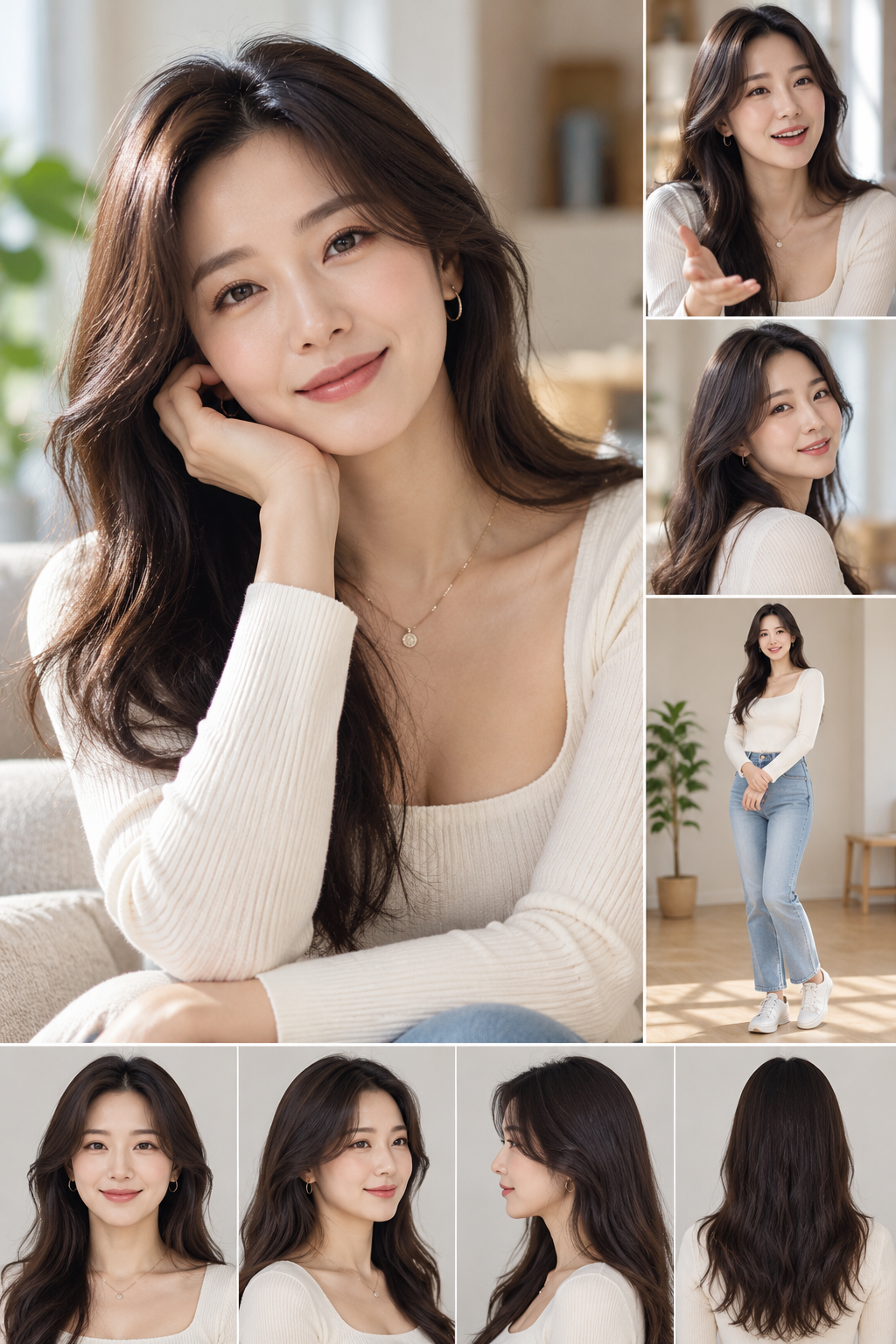
일관된 캐릭터 이미지면 무엇이든 됩니다. 정면 인물 사진이 선명한 시트가 가장 좋습니다.
의상 이미지
GPT 2.5
Magnific에서 사용. 9:16 이미지 1장당 100크레딧 → 룩 4개에 400크레딧.
모션
Kling 4.0
Omni Reference. 720p 15초에 162크레딧 (레퍼런스 클립 길이도 과금됩니다).
음악
Suno v6
한 번 생성하면 완곡 두 곡이 나오고, 그중 가장 좋은 15초를 잘라 씁니다.
레퍼런스 클립: 위에서 내려다보며 룩 사이마다 실링팬이 렌즈를 가로지르는 짧은 의상 체인지 영상을 찾으세요. Kling이 카메라, 타이밍, 전환을 그대로 따라 하므로 원하는 템포와 가까울수록 좋습니다.
01
캐릭터 만들기
캐릭터 시트 · 레퍼런스 인물 사진
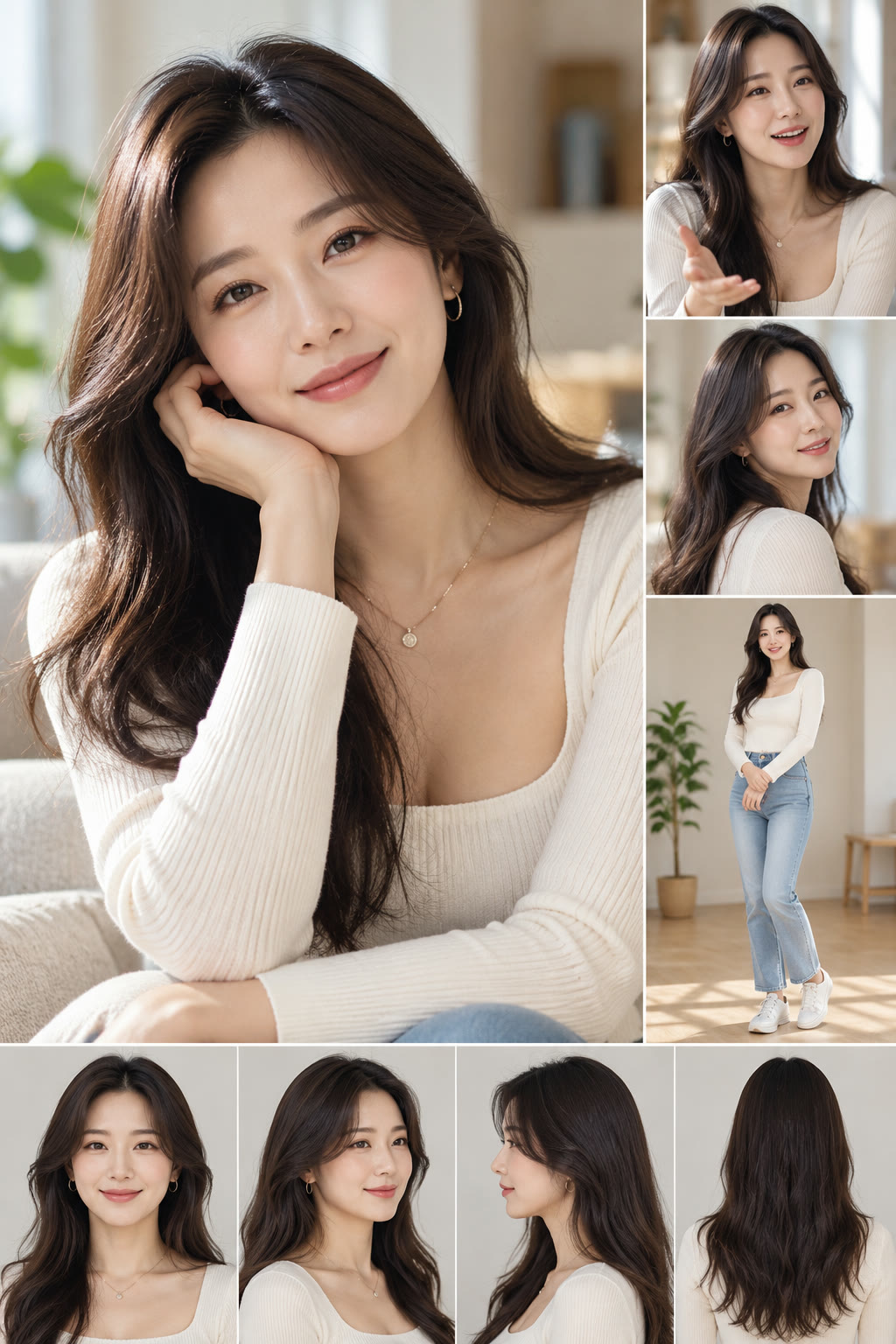
- 얼굴이 선명하게 보이는 캐릭터 시트에서 시작합니다: 큰 인물 사진, 몇 가지 표정, 전신 사진, 턴어라운드.
- 큰 인물 사진만 잘라내 레퍼런스 이미지로 저장합니다. 2단계에서 업로드할 이미지입니다.
- 모든 컷에서 고정하고 싶은 특징을 적어 둡니다 — 여기서는 옆 가르마의 긴 다크 브라운 웨이브 헤어, 피부 톤, 체형 비율. 모든 프롬프트에 들어갑니다.
왜 잘라야 하나요? 시트 전체를 올리면 이미지 모델이 콜라주 레이아웃을 따라 해서, 깔끔한 사진 한 장 대신 격자 이미지를 만들기 쉽습니다.
⬇ 캐릭터 시트 다운로드 (PNG)
02
의상 네 벌 생성하기
Magnific의 GPT 2.5 · 9:16 · 생성 1회당 이미지 1장
- Magnific에서 GPT 2.5를 열고 비율을 9:16으로 설정한 뒤, 잘라낸 인물 사진을 레퍼런스 이미지로 업로드합니다.
- 네 번 따로 생성합니다 — 룩마다 프롬프트 하나, 이미지 한 장.
- 네 프롬프트 모두 첫 부분의 인물 묘사는 똑같이 두고, 의상·배경·포즈·카메라 줄만 바꿉니다.
- 결과를 하나씩 확인합니다: 한 사람, 전신, 레퍼런스와 같은 얼굴. 빗나간 룩은 다시 생성합니다 (저희는 정면을 보도록 룩 02를 다시 만들었습니다).
한 프롬프트로 네 장을 요청하지 마세요. 한 번 생성하면 이미지 한 장이 나오므로, 네 장을 요청하면 콜라주나 거의 똑같은 네 장이 나옵니다. 따로 생성해야 확실히 다른 룩이 나옵니다.
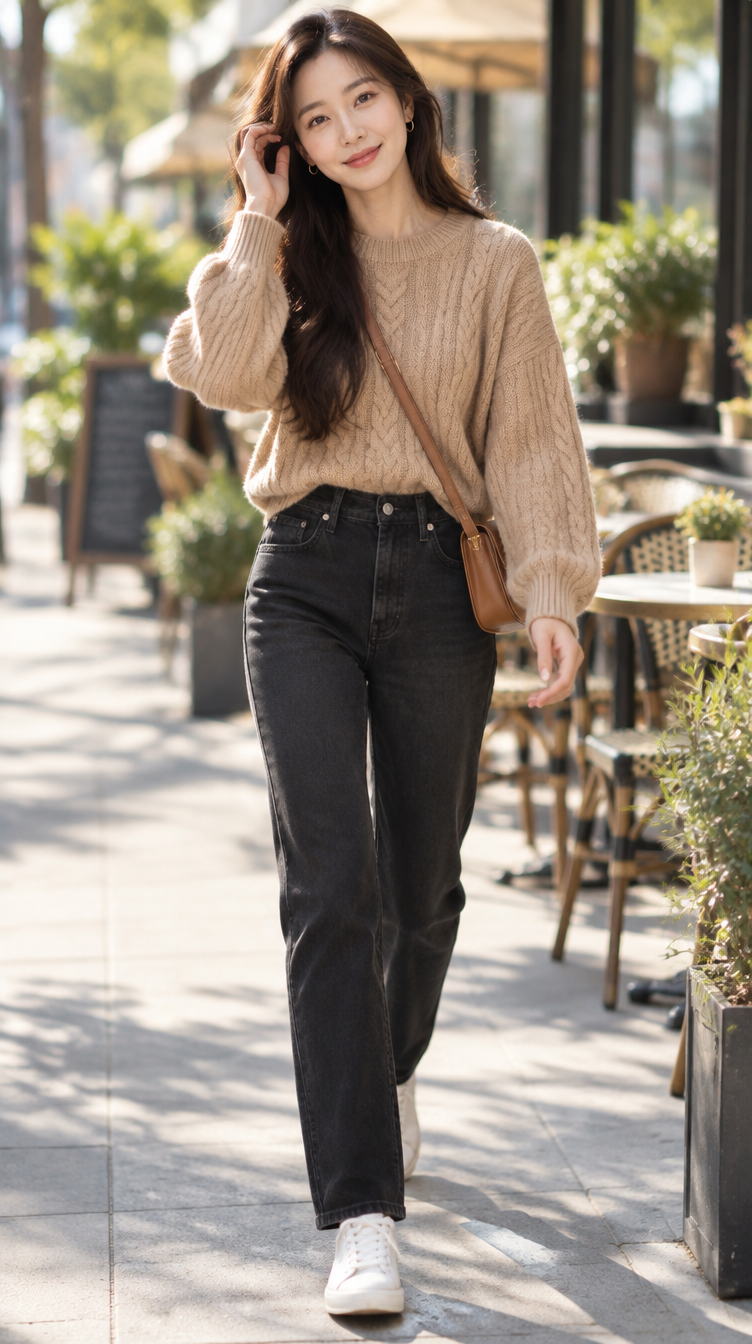
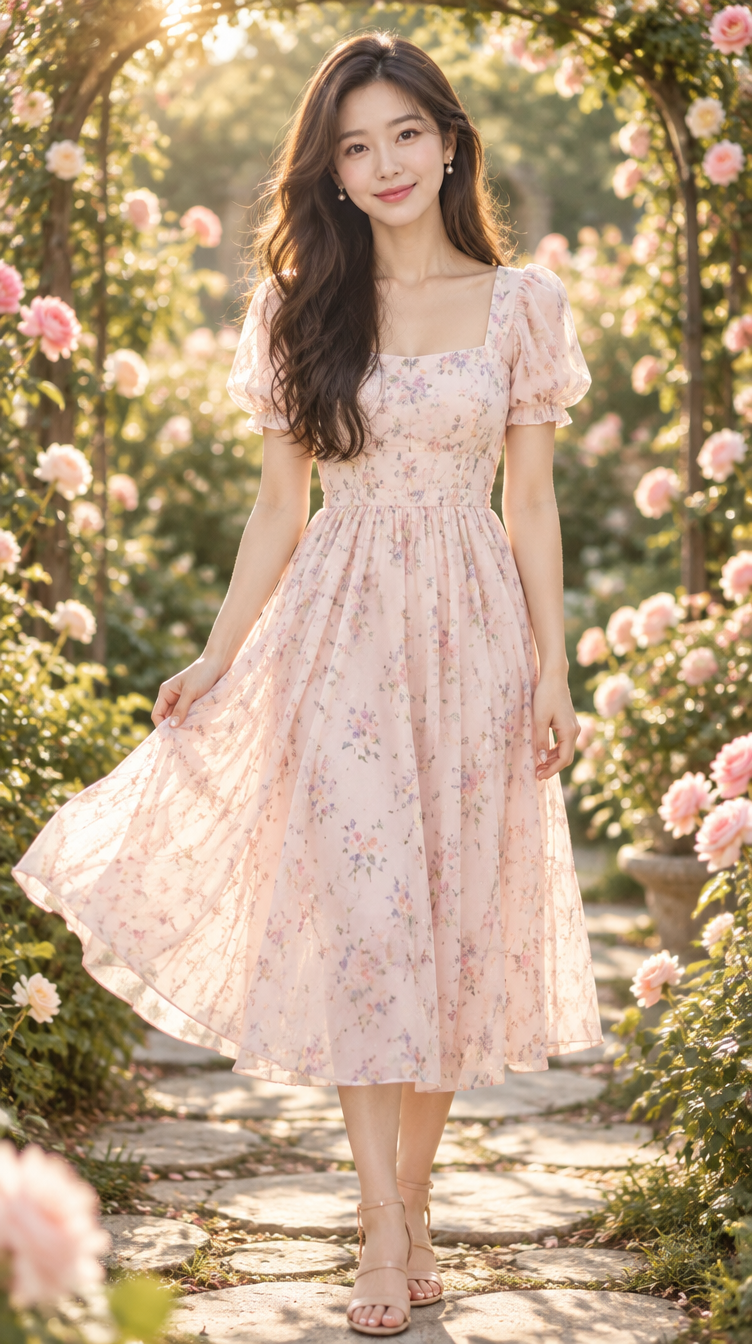
결과 — 룩을 탭하면 릴에서 해당 장면을 볼 수 있습니다
네 가지 프롬프트
룩 01 · 캐주얼 시크
Use the reference image only for the woman's identity: same face, facial features, long dark-brown wavy hair with side part, skin tone, and body proportions. Do NOT copy the reference's outfit, background, or layout. Single photorealistic full-body photograph, 9:16 vertical, one person, one frame — no collage, no panels, no borders, no text.
Outfit: oversized camel cable-knit sweater tucked into high-waisted black straight-leg jeans, white leather low-top sneakers, small gold hoops, crossbody tan leather bag.
Setting: sunlit city sidewalk café, outdoor tables, morning light.
Pose: walking toward camera mid-stride, one hand adjusting hair, candid smile.
Camera: 35mm, eye level, shallow depth of field, natural daylight.
룩 02 · 로맨틱 페미닌
Use the reference image only for the woman's identity: same face, facial features, long dark-brown wavy hair with side part, skin tone, and body proportions. Do NOT copy the reference's outfit, background, or layout. Single photorealistic full-body photograph, 9:16 vertical, one person, one frame — no collage, no panels, no borders, no text.
Outfit: flowing midi dress in pale blush pink with small pastel floral print, puff sleeves, cinched waist, nude strappy sandals, delicate pearl earrings.
Setting: blooming rose garden with stone path and arched trellis, golden hour.
Pose: standing facing the camera directly, front view, body and shoulders square to the lens, looking straight into the camera, one hand lightly holding the skirt so it sways, soft warm smile.
Camera: 85mm, eye level, warm backlight, dreamy bokeh.
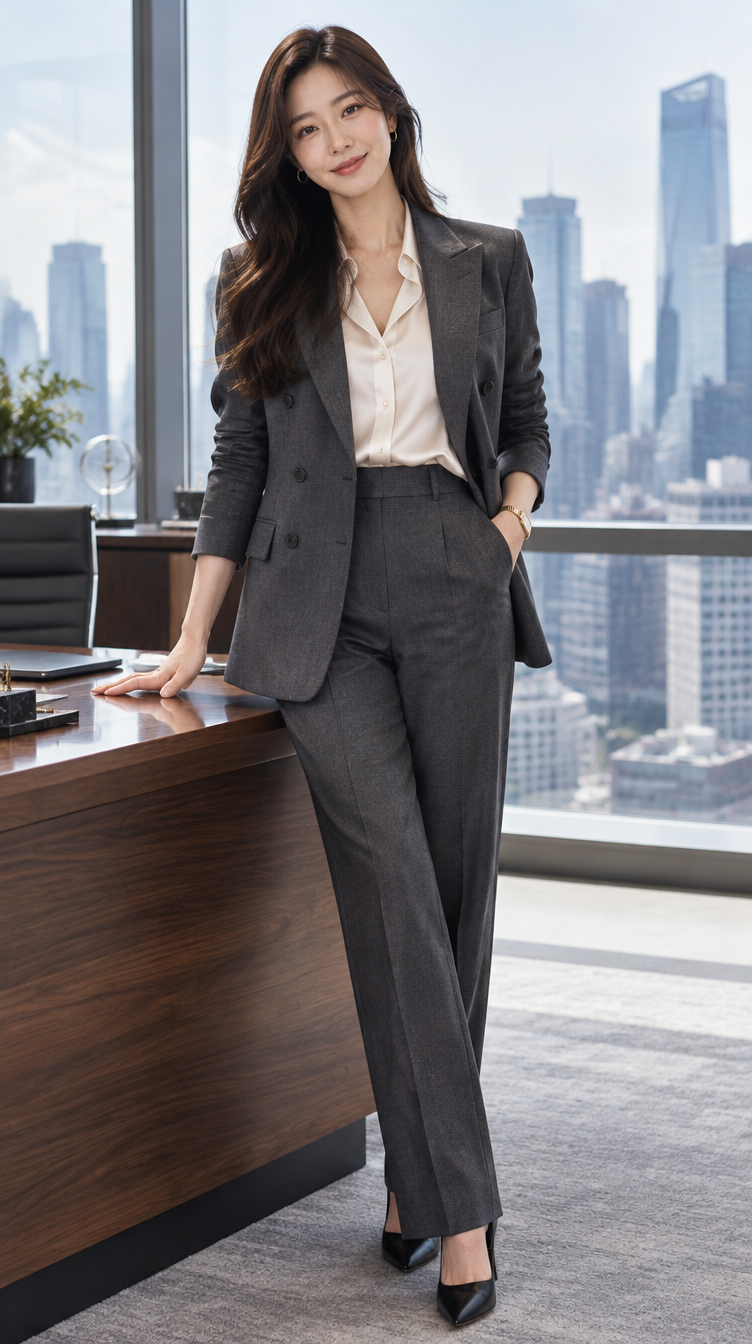
룩 03 · 비즈니스 엘레강스
Use the reference image only for the woman's identity: same face, facial features, long dark-brown wavy hair with side part, skin tone, and body proportions. Do NOT copy the reference's outfit, background, or layout. Single photorealistic full-body photograph, 9:16 vertical, one person, one frame — no collage, no panels, no borders, no text.
Outfit: tailored charcoal-grey double-breasted pantsuit, ivory silk blouse, black pointed-toe pumps, slim gold watch, hair swept behind one shoulder.
Setting: modern luxury corner office, floor-to-ceiling windows, city skyline, walnut desk.
Pose: standing confidently beside the desk, one hand resting on it, three-quarter angle, composed smile.
Camera: 50mm, slightly low angle, soft window light with cool tones.
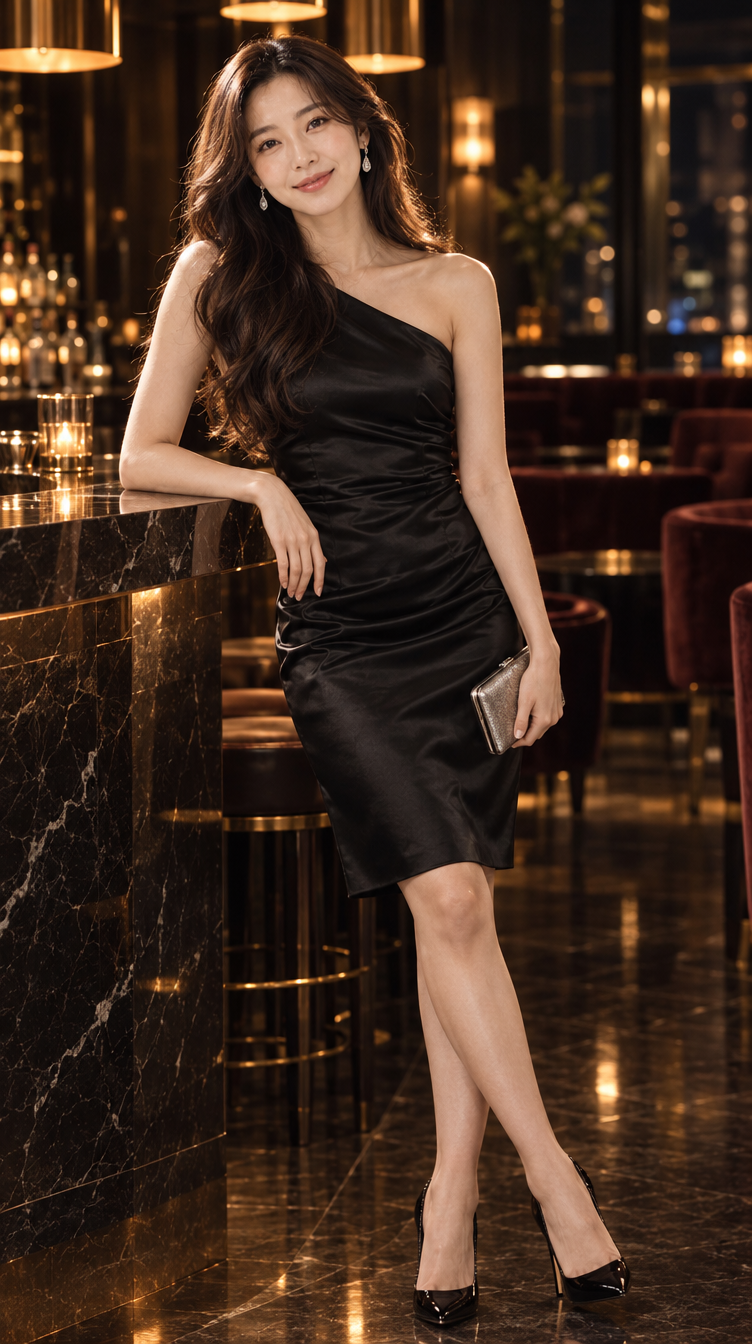
룩 04 · 모던 이브닝
Use the reference image only for the woman's identity: same face, facial features, long dark-brown wavy hair with side part, skin tone, and body proportions. Do NOT copy the reference's outfit, background, or layout. Single photorealistic full-body photograph, 9:16 vertical, one person, one frame — no collage, no panels, no borders, no text.
Outfit: sleek black satin one-shoulder cocktail dress, knee length, black stiletto heels, diamond drop earrings, small metallic clutch, hair in soft glamorous waves.
Setting: upscale hotel lounge, dark marble bar, warm amber pendant lights, velvet seating.
Pose: leaning against the bar, one heel crossed, holding the clutch, confident gaze at camera.
Camera: 50mm, low-key moody lighting, rim light on hair, night ambience.
03
Kling 4.0으로 움직이기
Kling 4.0 · Omni Reference · 크리에이티브 재현
- Kling에서 Omni Reference를 선택합니다 (Keyframes가 아닙니다 — 둘은 함께 쓸 수 없습니다).
- 의상 이미지 네 장을 순서대로 올린 다음 레퍼런스 클립을 올립니다. Kling은 업로드 순서대로 번호를 붙입니다:
@Image1–@Image4,@Video1. - 아래 설정을 적용하고 영상 프롬프트를 붙여 넣습니다.
- 생성한 뒤, 다음 단계로 넘어가기 전에 의상 순서를 확인합니다.
| 모드 | Omni Reference |
|---|---|
| 길이 | 15초 (레퍼런스와 동일) |
| 비율 | 9:16 |
| 해상도 | 720p |
| 오디오 | 원본 사운드 유지 (5단계에서 교체) |
Kling 4.0 공식 가이드의 프롬프트 규칙: 모든 에셋에 분명한 역할을 줍니다. “Edit @Video1”(원본 클립 편집)이 아니라 “Reference @Video1”(재현)이라고 씁니다. 부정어를 늘어놓기보다 보고 싶은 것을 묘사하세요 — 꼭 필요한 건 “no subtitles”뿐입니다. 그리고 팬이 지나가는 사이사이에 의상마다 자리가 생기도록 시간대별 시퀀스를 짜 줍니다.
의상 순서를 주의하세요. 저희 작업에서는 Kling이 슈트와 플로럴 원피스의 순서를 바꿨습니다. 낮에서 밤으로 자연스럽게 흘러가서 그대로 두었지만, 순서가 중요하다면 (아래 프롬프트처럼) 각 시간대 안에 의상을 자세히 묘사하고 다시 생성하세요.
영상 프롬프트 · Kling 4.0
[Asset Roles]
Reference @Video1 for the camera position, framing, top-down overhead angle, set, lighting, body pose, small movements, timing, and the ceiling-fan-blade occlusion transitions. Recreate @Video1 shot-for-shot, replacing the woman and her outfits.
@Image1, @Image2, @Image3, and @Image4 all define the same woman. Reference her facial features, long dark-brown wavy hair with a side part, skin tone, and body proportions, and keep them strictly consistent in every segment.
Each image also defines one outfit: @Image1 is outfit 1, @Image2 is outfit 2, @Image3 is outfit 3, @Image4 is outfit 4. Preserve each outfit's garments, colors, fabrics, shoes, and accessories exactly. Carry over only the woman and her outfits from the images; the scene, lighting, and pose come from @Video1, not from the image backgrounds (café, office, garden, lounge).

[Overall Settings]
Scene and texture: a straight-down overhead view of a faded rose-and-blue vintage Persian rug on a light wood floor, the side of a cream bouclé sofa running along the left edge of the frame, warm afternoon sunlight falling diagonally across the rug in soft window-pane stripes. A dark walnut ceiling-fan blade with a round brass screw sweeps across the lens between the camera and the floor at each outfit change.
Visual style: photorealistic social-media fashion video, natural skin texture with visible pores, real fabric folds and creases, soft natural contact shadows where her body touches the rug.
Camera tone: locked-off top-down camera directly above her, warm natural color, gentle contrast, sharp focus on her.
She lies on her back centered on the rug, long hair fanned out around her head, arms relaxed at her sides, looking straight up into the lens with a soft smile, and makes small natural movements as in @Video1: a slight head tilt, shifting her hands, a blink and a smile.

[Sequence of Events]
0–1.5s: The overhead view drifts and settles into centered framing exactly as in @Video1. She lies on the rug wearing outfit 1 from @Image1: oversized camel cable-knit sweater, high-waisted black straight-leg jeans, white leather low-top sneakers, tan leather crossbody bag resting on the rug beside her hip, small gold hoop earrings.
1.5–5.0s: Outfit 1 holds. She settles, tilts her head slightly, and smiles up at the camera.
5.0–6.0s: The fan blade sweeps across the lens as an occlusion transition, then hard cut to the same position.
6.0–9.0s: Outfit 2 from @Image2: tailored charcoal-grey double-breasted pantsuit, ivory silk blouse, black pointed-toe pumps, slim gold watch. Same pose on the rug, a small hand shift and a confident smile.
9.0–10.0s: The fan blade sweeps across the lens as an occlusion transition, then hard cut.
10.0–12.0s: Outfit 3 from @Image3: pale blush-pink midi dress with a small pastel floral print, puff sleeves and a cinched waist, the skirt spread out flat on the rug around her legs, nude strappy sandals, pearl earrings. A soft laugh and a slight head tilt.
12.0–13.5s: The fan blade sweeps across the lens as an occlusion transition, then hard cut.
13.5–15.0s: Outfit 4 from @Image4: sleek black satin one-shoulder knee-length cocktail dress, black stiletto heels, diamond drop earrings, small metallic clutch held in one hand on the rug. She holds a confident gaze into the lens to the final frame.
The fan blade fully covers her at the moment each outfit changes; she reappears in exactly the same spot and pose. Her face and hair stay identical in all four segments. No subtitles.
04
Suno v6로 음악 만들기
Suno v6 · Advanced 모드 · 연주곡
- suno.com → Create에서 v6를 고르고 Advanced로 전환합니다.
- Lyrics는 비워 둡니다 — 가사 칸이 비어 있으면 연주곡이 됩니다.
- 아래 스타일을 Styles에 붙여 넣습니다. 입력란 아래의 추천 칩은 누르지 마세요.
- Create를 누르고 두 버전을 들어 본 뒤, 마음에 드는 곡을 MP3로 다운로드합니다.
Styles 아래의 파란 요술봉 버튼은 누르지 마세요 — 스타일 문구를 다시 써 버립니다. 이미 눌렀다면 Styles 입력란 위쪽의 되돌리기 화살표를 누르세요. 또한 Suno는 15초짜리 곡을 만들 수 없어서 완곡(저희는 2:35)이 나오며, 5단계에서 잘라 씁니다.
chic fashion reel, nu-disco house, 118 BPM, groovy bassline, crisp four-on-the-floor kick, finger snaps, glossy synth chords, filtered build-ups into clean drops, stylish confident runway mood, instrumental, no vocals
05
오디오 자르고 싱크 맞추기
ffmpeg (또는 아무 영상 편집기)
- 비트가 드롭되는 지점, 즉 킥과 베이스가 들어오는 순간을 찾습니다. 저희 곡에서는 0:14.89입니다.
- 그 비트에 정확히 맞춰 15초를 자르고, 아주 짧은 페이드인과 1.2초 페이드아웃을 넣습니다.
- Kling 영상의 오디오를 잘라낸 음악으로 교체합니다. 영상은 그대로 복사되므로 화질 손실이 없습니다.
# 1) 15-second cut starting on the drop (0:14.89)
ffmpeg -ss 14.89 -t 15.04 -i song.mp3 \
  -af "afade=t=in:st=0:d=0.03,afade=t=out:st=13.84:d=1.2" \
  -c:a libmp3lame -b:a 192k music-15s.mp3

# 2) swap it into the Kling video
ffmpeg -i kling.mp4 -i music-15s.mp3 -map 0:v -map 1:a \
  -c:v copy -c:a aac -b:a 192k -shortest -movflags +faststart final.mp4
왜 드롭부터일까요? 약 121 BPM에서 드롭부터 시작하면 팬이 지나가는 각 순간(5.8초, 9.8초, 13.5초)과 비트가 0.1초 안쪽으로 맞아떨어져, 의상이 바뀔 때마다 음악에 딱 맞습니다.
⬇ 15초 컷 다운로드 (MP3)
다운로드
모든 이미지, 영상, 음악을 원본 화질로.
🗂️전체 다운로드ZIP · 21 MB · 모든 이미지, 영상, 음악
🎬릴 영상MP4 · 9:16 · 15초 · 9.2 MB
🎧음악 · 15초 컷MP3 · 0.3 MB
🎵음악 · 전체 곡MP3 · 2:35 · 3.6 MB
🧍♀️캐릭터 시트PNG · 1024×1536 · 2.3 MB
👖룩 01 · 캐주얼 시크PNG · 752×1344 · 1.5 MB
👗룩 02 · 로맨틱 페미닌PNG · 752×1344 · 1.6 MB
💼룩 03 · 비즈니스 엘레강스PNG · 752×1344 · 1.5 MB
🍸룩 04 · 모던 이브닝PNG · 752×1344 · 1.4 MB