Seedance 2.5The Pigeon Freeze
손가락 한 번에, 세상이 멈춘 순간
손가락 한 번에, 세상이 멈춘 순간
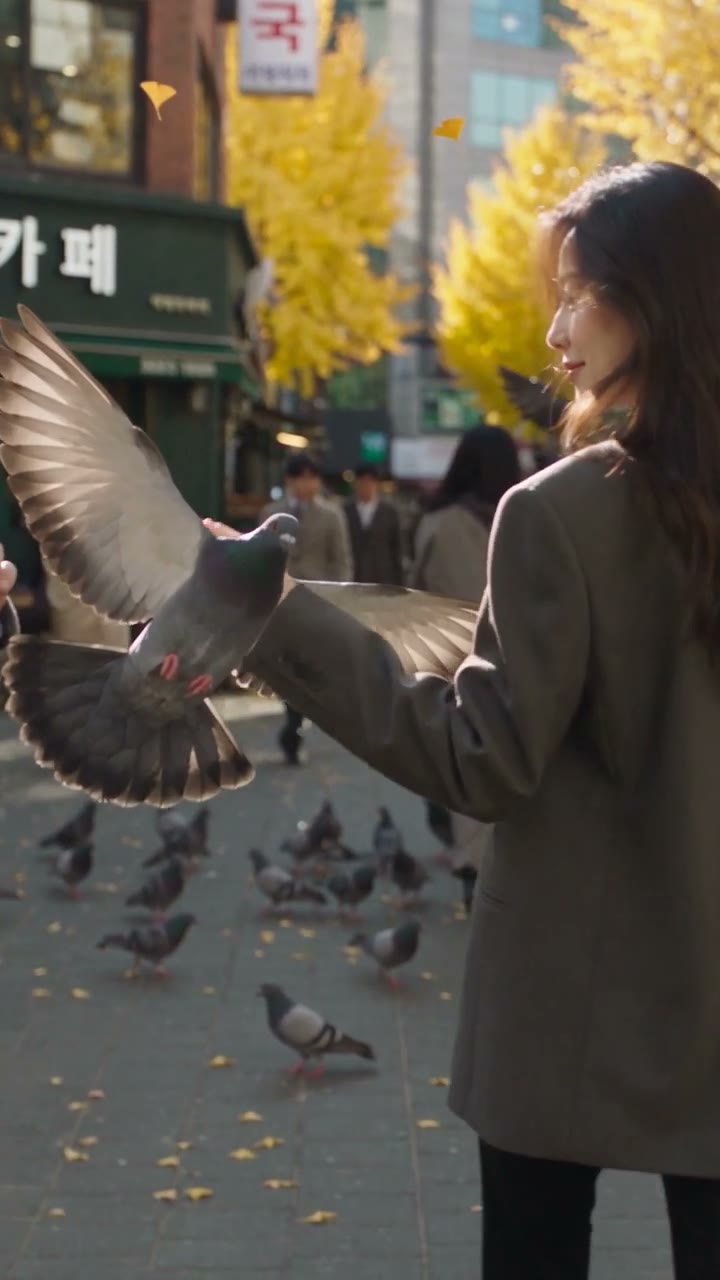
가을 아침, 노란 은행나무가 늘어선 서울의 거리. 그녀가 손가락을 튕기자 하얀 충격파가 퍼지고, 걷던 사람들과 날아오르던 비둘기가 그 자리에 멈춥니다. 멈춘 세상 속을 걷던 그녀는 공중에 떠 있는 비둘기의 부리를 살짝 건드리고, 다시 손가락을 튕겨 시간을 흐르게 합니다.
이 가이드는 캐릭터 시트 준비부터 Seedance 2.5 공식 프롬프트 가이드 적용, 한글 간판, Higgsfield 설정, 두 테이크의 비교까지 실제로 사용한 프롬프트와 설정을 그대로 공유합니다.
- 길이10초
- 포맷9:16 · 720p
- 모델Seedance 2.5
- 테이크2번째 테이크
준비물
캐릭터 시트 한 장과 공식 가이드, 그리고 프롬프트 하나. 크레딧은 이번 작업에서 실제로 사용한 양입니다.
정면·측면·뒷모습과 전신 컷이 담긴 시트 한 장. Seedance 2.5는 여러 각도가 한 장에 담긴 시트를 지원합니다.
Higgsfield에서 사용. 10초 · 720p 한 테이크에 70크레딧 → 두 테이크에 140크레딧.
BytePlus ModelArk의 Dreamina Seedance 2.5 프롬프트 가이드. 프롬프트 구조와 자주 생기는 문제의 해결법이 담겨 있습니다.
레퍼런스 이미지 크기 조정과 프레임 확인에 사용합니다. 아무 이미지 편집기로도 충분합니다.
캐릭터 시트 준비하기
캐릭터 시트 · 720×1080으로 크기 조정

- 얼굴이 선명한 캐릭터 시트를 준비합니다: 큰 인물 사진, 표정 컷, 전신 사진, 정면·측면·뒷모습.
- 시트를 출력 해상도 이하로 줄입니다. 이번에는 1024×1536을 720×1080으로 줄였습니다.
- 프롬프트 첫머리에서 이 이미지를 Image 1로 부르고, 무엇을 가져올지 정해 줍니다 — 얼굴, 헤어스타일, 피부 톤, 체형 비율만. 시트 속 의상과 거실 배경은 쓰지 않도록 적어 둡니다.

공식 가이드대로 구조 잡기
Dreamina Seedance 2.5 프롬프트 가이드 · BytePlus ModelArk
공식 가이드는 Seedance 2.5를 “영상 제작자”로 대하고, 시각적인 스토리텔링 순서로 구조화된 프롬프트를 쓰라고 권합니다. 이번 프롬프트는 이 순서를 그대로 따랐습니다.
- 에셋 지정 — 업로드 순서대로 번호를 붙이고 용도를 적습니다. “Image 1은 주인공의 캐릭터 시트”.
- 한 줄 요약 — 주인공 + 장소 + 사건 + 장르/스타일 + 카메라 움직임.
- 비주얼 스타일 — 카메라와 렌즈, 빛, 필름 그레인, 자연스러운 피부 질감, 포맷.
- 의상과 장소 — 레퍼런스 이미지에서 가져오지 않고 프롬프트로 정합니다.
- 타임라인 — 빈틈없는 정수 초 구간마다
[Medium close-up, slow push-in]처럼 샷을 적습니다. - 추가 메모 — 영상 내내 유지해야 할 것들: 같은 얼굴, 같은 간판 글자.
- 오디오 — 환경음, 시간에 맞춘 효과음, 음악·자막 금지.
10초 타임라인 쓰기
타임스탬프 4구간 · 0초부터 10초까지 빈틈없이
10초 안에 걷기, 스냅, 시간 정지, 재개까지 네 장면을 넣었습니다. 처음에는 15초로 썼다가 10초에 맞춰 장면을 줄였습니다.
장면 — 탭하면 영상에서 해당 장면을 볼 수 있습니다
최종 프롬프트
영상 프롬프트 · Seedance 2.5
Asset binding: Image 1 is a multi-view character reference sheet of the protagonist, a Korean woman in her mid-30s. Use Image 1 only for her face, hairstyle, skin tone, and body proportions. Do not use the outfit or the living-room background shown in Image 1.

Summary: A Korean woman (Image 1) walks down a busy Seoul street on an autumn morning, snaps her fingers to freeze time, strolls through the frozen world, and snaps again to restore it. Realistic live-action sci-fi, tracking camera, ending on a crane pull-back.

Visual style: Live-action cinematic film, shot on Arri Alexa Mini LF, 50mm lens, natural morning sunlight from the upper left, shallow depth of field, fine film grain, authentic skin texture, natural lifelike performance, subtle micro-expressions, no excessive beautification or skin smoothing. 9:16 vertical frame, 720p, 10 seconds.

Wardrobe: She wears an oversized charcoal-gray blazer over a cream knit top, tailored black trousers, and black leather ankle boots. Her long dark-brown wavy hair falls past her shoulders, matching Image 1.

Location: A busy Korean shopping street in central Seoul in autumn. Wide sidewalks, yellow ginkgo trees, café terraces, a bus stop, and Korean office workers in coats walking past. A flock of gray city pigeons pecks along the sidewalk.

Korean business signage: Exactly three storefront signs are visible, each written in standard Korean Hangul, correctly spelled, sharp, and clearly legible. Each sign is a flat, front-facing board above its shop entrance, with clean bold sans-serif lettering.
- Sign 1 (café, left side of the street): the Korean word "카페". The syllables appear in this exact order, left to right: 카, 페. White letters on a dark green board.
- Sign 2 (pharmacy, center): the Korean word "약국". The syllables appear in this exact order, left to right: 약, 국. Red letters on a white lightbox.
- Sign 3 (bakery, right side of the street): the Korean word "빵집". The syllables appear in this exact order, left to right: 빵, 집. Dark brown letters on a cream board.
Each sign shows only its Korean word, with no smaller text beneath it.
All other shopfronts in the background use plain colored panels, awnings, and simple logos without any lettering.

0-2s: [Medium-wide tracking shot, eye-level] She walks confidently toward the camera through the morning crowd. Sunlight filters through the ginkgo leaves, and pigeons hop aside near her boots.

2-4s: [Medium close-up, slow push-in] She gives a small, knowing smirk, raises her right hand to shoulder height, and snaps her fingers: her middle finger slides off her thumb with a crisp, audible snap. At the 3-second mark, a ring of bright white light bursts from her fingertips and expands outward across the street like a transparent shockwave.

4-7s: [Tracking shot following her, slight handheld feel] Time is frozen. Pedestrians stop mid-stride, a passerby's scarf hangs mid-flutter, a group of pigeons is frozen in mid-takeoff one meter above the sidewalk with wings spread, and ginkgo leaves are suspended in the air. Only she moves, walking calmly between the frozen people. At the 6-second mark she stops beside one frozen pigeon hovering at shoulder height in front of her and playfully taps the tip of its beak with one fingertip. The pigeon stays fully in front of her hand, and her arm stays clear of the bird's body and wings.

7-8s: [Medium close-up, eye-level] She turns to face the camera with a calm, confident smile and snaps her fingers again. The white shockwave rushes back inward and collapses into her fingertips.

8-10s: [Crane shot, rising and pulling back to a wide shot] The world resumes. Pedestrians continue walking, the pigeons scatter upward in a burst of flapping wings, and the leaves fall. The camera rises and pulls away as she walks into the crowd on the busy Seoul street.

Additional notes: Her face, hairstyle, and body proportions strictly match Image 1 and stay consistent throughout, with no face changes. The three Korean signs keep exactly the same text, spelling, and lettering in every frame, including during the time freeze and the camera moves. Her hand and the pigeon stay physically separate, touching only at her fingertip and the tip of its beak. Pedestrians near the frame edges appear as complete figures. Normal human eyes, no glowing eyes; the white light comes only from her fingertips. Realistic shockwave and time-freeze effects, volumetric morning light, natural motion blur on moving people, stable motion, smooth visuals.

Audio: Realistic city ambience with footsteps, distant traffic, and pigeon wings. A crisp finger-snap sound at the 3-second mark and at the 7-second mark. During the time freeze (4-7s) the city sound cuts to near silence, leaving only her footsteps. No dialogue. No background music, no BGM, no score, no melody. No subtitles.
정확한 한글 간판 만들기
짧은 단어 세 개 · 음절 단위로 철자 지정
- 글자가 들어간 간판은 딱 세 개로 정하고, 모두 짧고 흔한 단어를 씁니다.
- 각 단어를 음절 하나씩 순서대로 적어 줍니다 — 공식 가이드가 철자 오류에 권하는 방법입니다.
- 나머지 가게는 글자 없는 색 패널, 차양, 단순한 로고로 채웁니다. 배경 간판이 깨진 한글의 가장 흔한 원인이기 때문입니다.
- 간판 아래 작은 글씨를 넣지 말고, 모든 프레임에서 같은 글자를 유지하라고 적습니다.
Higgsfield에서 생성하기
Higgsfield · Seedance 2.5 · Omni Reference · 생성 1회당 영상 1개
- Higgsfield에서 Seedance 2.5를 고르고 모드를 Omni Reference로 바꿉니다.
- 줄인 캐릭터 시트를 레퍼런스 이미지로 올립니다. 첫 프레임(start image)으로 넣지 않습니다.
- 아래 설정을 적용하고 3단계의 프롬프트를 붙여 넣습니다.
- 한 번에 한 테이크만 생성하고, 결과를 프레임 단위로 확인한 뒤 프롬프트를 고칩니다.
| 모델 | Seedance 2.5 |
|---|---|
| 모드 | Omni Reference |
| 길이 | 10초 |
| 비율 | 9:16 |
| 해상도 | 720p |
| 오디오 | 생성 켜기 |
| 레퍼런스 | 캐릭터 시트 (Image 1) |
테이크 비교와 수정
테이크 2개 · 프레임 단위로 확인
첫 테이크에서 문제를 찾고, 프롬프트를 고쳐 두 번째 테이크를 최종작으로 골랐습니다.
다운로드
영상, 캐릭터 시트, 프롬프트를 원본 그대로. 필요한 파일만 골라 받으세요.