 For macOS · Free
Talking Calendar
A Mac calendar that tells you the date, out loud.
What it does
Speaks the date
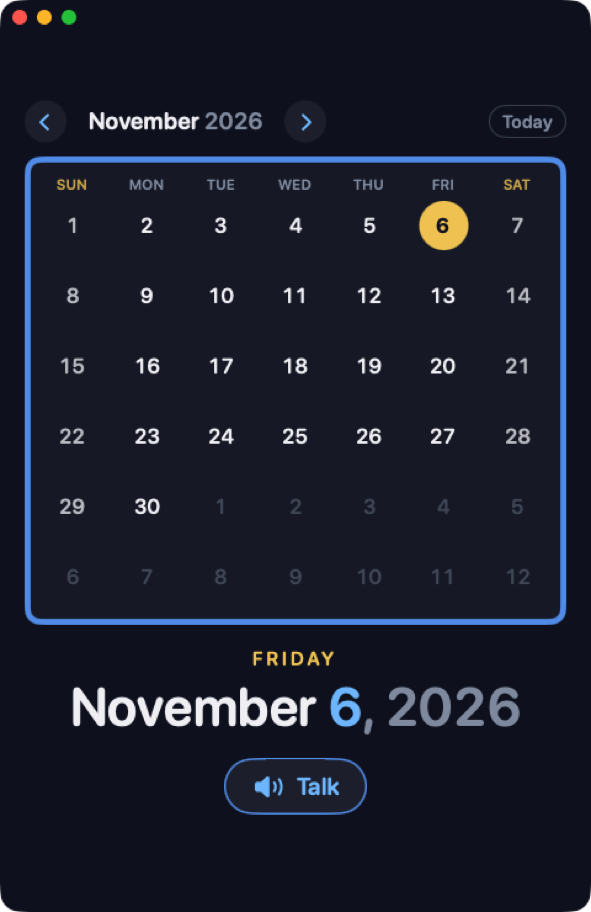
Press Talk or the space bar and it says “Today is Friday, November sixth, 2026.” Pick another day and it tells you how far away it is: “Friday, December twenty-fifth is 49 days from today.”
A clean month view
Six weeks at a glance in the same colors as Talking Clock. Today is ringed in gold, and the week starts on the day your Mac uses.
Keyboard friendly
Arrow keys move by day and by week, ⌘← ⌘→ change the month, and T jumps back to today.
How to install
Talking Calendar comes as a disk image (.dmg), the standard way to install a Mac app from the web.
- Download the DMG. Click Download for Mac;
Talking-Calendar-1.0.dmgis saved to your Downloads folder. - Open the DMG. Double-click
Talking-Calendar-1.0.dmgin Downloads (or click it in your browser’s download list). A Talking Calendar window like the one shown here opens. - Drag it to Applications. Follow the arrow and drag the Talking Calendar icon onto the Applications folder. This copies the app to your Mac.
- Eject the disk. Click ⏏ next to Talking Calendar in the Finder sidebar (or drag the disk icon on the desktop to the Trash). You can then delete the
.dmgfrom Downloads. - Launch the app. Double-click Talking Calendar in your Applications folder. The first time, macOS asks “Talking Calendar” is an app downloaded from the Internet. Are you sure you want to open it? and notes that Apple checked it for malicious software. Click Open.
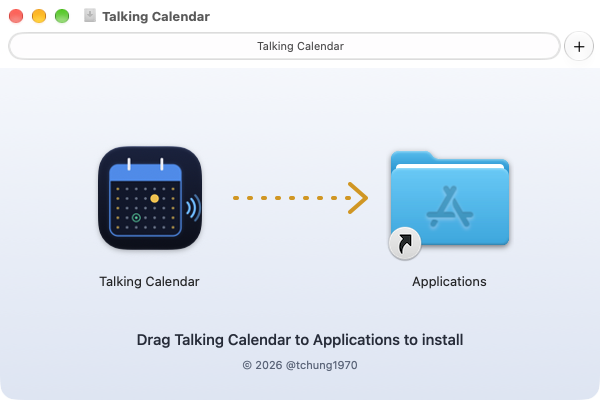
Note: run the app from Applications, not from inside the disk image — ejecting the disk takes the app with it. To uninstall, drag Talking Calendar from Applications to the Trash.
Signed with my Apple Developer ID
Safe to open — Apple has checked it
Talking Calendar is distributed outside the Mac App Store, so it carries both of Apple’s credentials for that.
- Apple Developer ID signature — signed with the “Developer ID Application: Thomas CHUNG (7FVXX299HB)” certificate, which Apple issues only to members of the Apple Developer Program. The signature proves the app comes from me and hasn’t been changed since I built it.
- Apple notarization — Apple scanned this exact build for malware and issued a notarization ticket. The ticket is stapled to both the app and the disk image, so macOS can verify it even offline.
- Hardened Runtime — macOS’s stricter app-security mode, required for notarization.
- It does nothing else — no account, no ads, no tracking, no network access, and it doesn’t read your calendars. It just tells the date.
To check for yourself, run this in Terminal after installing:
$ codesign -dv --verbose=2 "/Applications/Talking Calendar.app" 2>&1 | grep -E "Authority|Team|Notarization"
Authority=Developer ID Application: Thomas CHUNG (7FVXX299HB)
Authority=Developer ID Certification Authority
Authority=Apple Root CA
Notarization Ticket=stapled
TeamIdentifier=7FVXX299HB

$ spctl -a -vv "/Applications/Talking Calendar.app"
/Applications/Talking Calendar.app: accepted
source=Notarized Developer ID
origin=Developer ID Application: Thomas CHUNG (7FVXX299HB)
It has a sibling: Talking Clock, a Mac clock that speaks the time.